最近接到一批数据需要分析,当然常规的就是先用bs4解析处理,提取内容。然而很早之前就听说过了网页内容自动抽取,于是就尝试了下,CxExtractor来自cx-extractor-python
目前我了解到的网页自动抽取方式有:
- 基于行块分布
- 基于文本密度
本篇中尝试的方法为基于行块分布的。CxExtractor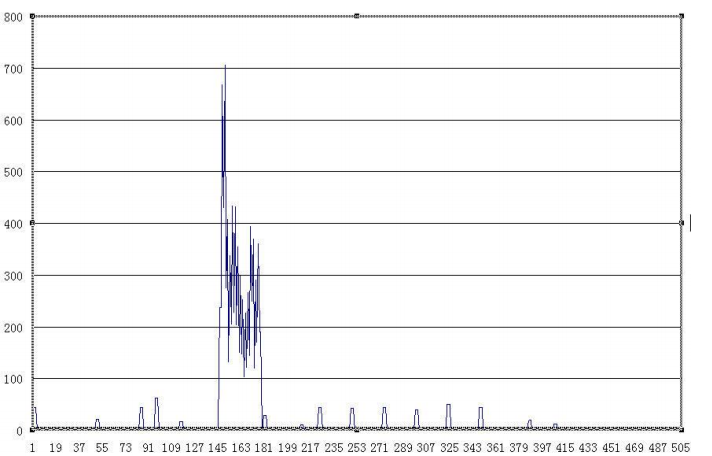
读取->提取->过滤即可
import re
import chardet
import requests

class CxExtractor:
    """cx-extractor implemented in Python"""

    __text = []
    # __threshold = 186
    __indexDistribution = []
    # __blocksWidth = 3

    def __init__(self, threshold=86, blocksWidth=3):
        self.__blocksWidth = blocksWidth
        self.__threshold = threshold

    def getText(self, content):
        if self.__text:
            self.__text = []
        lines = content.split('\n')
        for i in range(len(lines)):
            # lines[i] = lines[i].replace("\\n", "")
            if lines[i] == ' ' or lines[i] == '\n':
                lines[i] = ''
        self.__indexDistribution.clear()
        for i in range(0, len(lines) - self.__blocksWidth):
            wordsNum = 0
            for j in range(i, i + self.__blocksWidth):
                lines[j] = lines[j].replace("\\s", "")
                wordsNum += len(lines[j])
            self.__indexDistribution.append(wordsNum)
        start = -1
        end = -1
        boolstart = False
        boolend = False
        for i in range(len(self.__indexDistribution) - 1):
            if(self.__indexDistribution[i] > self.__threshold and (not boolstart)):
                if (self.__indexDistribution[i + 1] != 0 or self.__indexDistribution[i + 2] != 0 or self.__indexDistribution[i + 3] != 0):
                    boolstart = True
                    start = i
                    continue
            if (boolstart):
                if (self.__indexDistribution[i] == 0 or self.__indexDistribution[i + 1] == 0):
                    end = i
                    boolend = True
            tmp = []
            if(boolend):
                for ii in range(start, end + 1):
                    if(len(lines[ii]) < 5):
                        continue
                    tmp.append(lines[ii] + "\n")
                str = "".join(list(tmp))
                if ("Copyright" in str or "版权所有" in str):
                    continue
                self.__text.append(str)
                boolstart = boolend = False
        result = "".join(list(self.__text))
        return result

    def replaceCharEntity(self, htmlstr):
        CHAR_ENTITIES = {'nbsp': ' ', '160': ' ',
                         'lt': '<', '60': '<',
                         'gt': '>', '62': '>',
                         'amp': '&', '38': '&',
                         'quot': '"', '34': '"', }
        re_charEntity = re.compile(r'&#?(?P<name>\w+);')
        sz = re_charEntity.search(htmlstr)
        while sz:
            entity = sz.group()
            key = sz.group('name')
            try:
                htmlstr = re_charEntity.sub(CHAR_ENTITIES[key], htmlstr, 1)
                sz = re_charEntity.search(htmlstr)
            except KeyError:
                # 以空串代替
                htmlstr = re_charEntity.sub('', htmlstr, 1)
                sz = re_charEntity.search(htmlstr)
        return htmlstr

    def getHtml(self, url):
        response = requests.get(url)
        encode_info = chardet.detect(response.content)
        response.encoding = encode_info['encoding']
        return response.text

    def readHtml(self, path, coding):
        page = open(path, encoding=coding)
        lines = page.readlines()
        s = ''
        for line in lines:
            s += line
        page.close()
        return s

    def filter_tags(self, htmlstr):
        re_nav = re.compile('<nav.+</nav>')
        re_cdata = re.compile('//<!\[CDATA\[.*//\]\]>', re.DOTALL)
        re_script = re.compile(
            '<\s*script[^>]*>.*?<\s*/\s*script\s*>', re.DOTALL | re.I)
        re_style = re.compile(
            '<\s*style[^>]*>.*?<\s*/\s*style\s*>', re.DOTALL | re.I)
        re_textarea = re.compile(
            '<\s*textarea[^>]*>.*?<\s*/\s*textarea\s*>', re.DOTALL | re.I)
        re_br = re.compile('<br\s*?/?>')
        re_h = re.compile('</?\w+.*?>', re.DOTALL)
        re_comment = re.compile('<!--.*?-->', re.DOTALL)
        re_space = re.compile(' +')
        s = re_cdata.sub('', htmlstr)
        s = re_nav.sub('', s)
        s = re_script.sub('', s)
        s = re_style.sub('', s)
        s = re_textarea.sub('', s)
        s = re_br.sub('', s)
        s = re_h.sub('', s)
        s = re_comment.sub('', s)
        s = re.sub('\\t', '', s)
        # s = re.sub(' ', '', s)
        s = re_space.sub(' ', s)
        s = self.replaceCharEntity(s)
        return s
具体可以点过去看一下,不难理解,在我的应用场景里,应用起来也很简单。不过在我这边的应用场景效果并不是非常好。因为这边的html是报告形式的,提取的手机数据为所有信息例如微信聊天记录,删除后的数据也有等等,基本是所有数据。而报告形式十分规整,没有所谓的大型的主体存在,大部分数据都非常规整。所以效果并不是99%的好,但已经很不错了。再稍微进行下处理就可以了。节省了不少时间
import glob
import codecs
import queue
import threading
from CxExtractor import CxExtractor

cx = CxExtractor(threshold=133)

uqueue = queue.Queue()

from bs4 import BeautifulSoup
import lxml

def parserfile(f):
    # f = open(fpath).read()
    with open(f, encoding='utf-16le') as c:
        content = c.read()

    soup = BeautifulSoup(content, 'lxml')
    texts = []
    for item in soup.select('.selfTable'):
        try:
            text = item.find_all('a')[0].text
            texts.append(text)
        except Exception as e:
            print(e)


    for item in soup.select('.OuterTable'):
        if item:
            for sub in item.find_all('td'):
                texts.append(sub.text)
    return texts
# parserfile(html)

# with codecs.open(html,encoding="utf-16") as f:
#     parserfile(f.read())

# parserfile('../html/Contents0.html')
# get('.OuterTable')
htmls = glob.glob("../html/*.html")

def parserfile_auto(htmlpath):
    html = cx.readHtml(htmlpath, coding='utf-16le')
    content = cx.filter_tags(html)
    s = cx.getText(content)
    return s

import os
for html in htmls:
    text = parserfile_auto(html)
    # text = parserfile(html)
    with open('./phone-text-auto/'+os.path.basename(html) + '.txt', 'w', encoding='utf-8') as textfile:
        # t = "\n".join(text)
        textfile.write(text)
对于提取后的数据即可进行分词,关键词提取,然后绘制成词云进行展示了。这里有一个问题就是,如果展示中文的话,worldcloud本身是不能显示的,需要指定字体路径才行。
#coding:utf-8
import matplotlib.pyplot as plt
from wordcloud import WordCloud
import jieba
import re
import jieba.analyse
# jieba.load_userdict('./dict.ji')
jieba.enable_parallel(4)

with open('./zhongwen.txt', errors='ignore') as f:
    text_from_file_with_apath = f.read()

def stopwordslist(filepath):
    stopwords = [line.strip() for line in open(
        filepath, 'r', encoding='utf-8').readlines()]
    return stopwords

stopwords = stopwordslist('./dict.jieba')

for i in stopwords:
    text_from_file_with_apath.replace(i, " ")
    jieba.add_word(i)

font_path = "/usr/share/fonts/truetype/wqy/wqy-microhei.ttc"
wordlist_after_jieba = jieba.cut(text_from_file_with_apath, cut_all=False)
wl_space_split = " ".join(wordlist_after_jieba)

my_wordcloud = WordCloud(font_path=font_path).generate(wl_space_split)
tags = jieba.analyse.extract_tags(text_from_file_with_apath, topK=100)

print(",".join(tags))

plt.imshow(my_wordcloud)
plt.axis("off")
plt.show()
词云的图片我就不放了,关于关联分析的话,我觉得可以做的地方有异常检测,转账记录分析,聊天记录分析,文本主题模型。很明显的例如这些个数据的分析中让我想到了neo4j中的sanbox里的川普Twitter分析,其中有很大的相似性。